

Short Resume
This article provides a step-by-step guide to replace an expired SSL Certificate for Oracle Business Intelligence 12c or Oracle Analytics Server production servers using OpenSSL and keytool conversions to JKS format followed by WebLogic console updates and service restarts, ensuring secure HTTPS connections, preventing downtime from handshake failures, and maintaining trust for enterprise analytics access.
Objective :
To update the expired SSL certificate for Oracle business intelligence 12c or Oracle Analytics Server by a new one .
A- Move the new intermediate certificate zip file to the middleware server IP 192.168.9.1
B- Unzipped under /app/ssl/ssl2025
oracle@dnlapp2:/app/ssl/ssl2025> ls -ltr
-rw-r--r-- 1 oracle oinstall 3272 Jul 31 17:44 dnlapp2.data-and-analytics.com.key
-rw-r--r-- 1 oracle oinstall 2573 Jul 31 17:53 dnlapp2_data-and-analytics_com_2023.crt
-rw-r--r-- 1 oracle oinstall 4054 Jul 31 17:53 dnlapp2_data-and-analytics_com.ca
C -Implement the steps below :
openssl pkcs12 -export -in dnlapp2_data-and-analytics_com_2023.crt -inkey dnlapp2.data-and-analytics.com.key -name dnlapp2 -out dnlapp2.data-and-analytics.com.p12
keytool -importkeystore -deststorepass data-and-analytics -destkeypass data-and-analytics -destkeystore dnlapp2.jks -srckeystore dnlapp2.data-and-analytics.com.p12 -srcstoretype PKCS12 -srcstorepass data-and-analytics -alias dnlapp2
keytool -import -trustcacerts -alias gogetroot -file dnlapp2_data-and-analytics_com.ca -keystore dnlapp2.jks
keytool -list -v -keystore dnlapp2.jks -storepass data-and-analytics
Note :
Last command lists the imported certificate successfully .
D-
1-Shutdown All the middleware services (using stop.sh)
cd /app/oracle/middleware/oracle_home/user_projects/domains/bi/bitools/bin
./stop.sh
2-Take a backup of the existing jks file : /app/ssl/dnlapp2.jks
mv dnlapp2.jks dnlapp2.jks_old_2022_23)
3-replace the old .jks file by the new one /app/ssl/ssl2025 to /app/ssl
4- Add New Certs to Java Ca certs
/usr/java8_64/bin/keytool -import -file dnlapp2_data-and-analytics_com_2023.crt -keystore /usr/java8_64/jre/lib/security/cacerts
/usr/java8_64/bin/keytool -import -file dnlapp2_data-and-analytics_com.ca -keystore /usr/java8_64/jre/lib/security/cacerts -alias goget
5-start weblogic admin server :
cd /app/oracle/middleware/oracle_home/user_projects/domains/bi/bin
./startWeblogic.sh
6-Upadte the Trust Keystore Passphrase for Admin Server :
Login to Admin Console : dnlapp2.data-and-analytics.com:9500/console
Environment -> Servers -> Admin Server (admin) ->
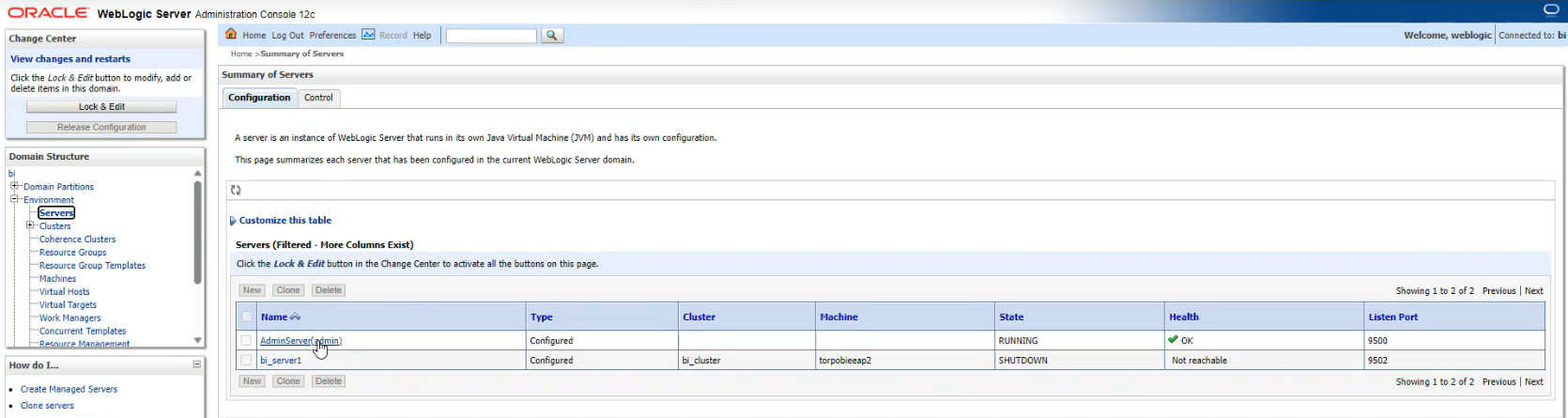
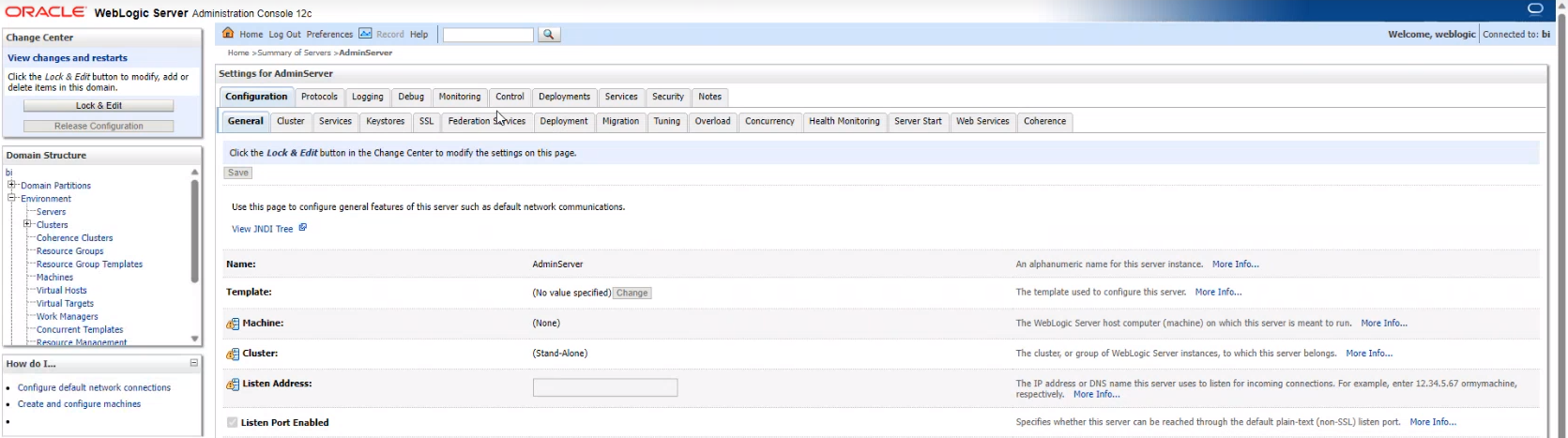
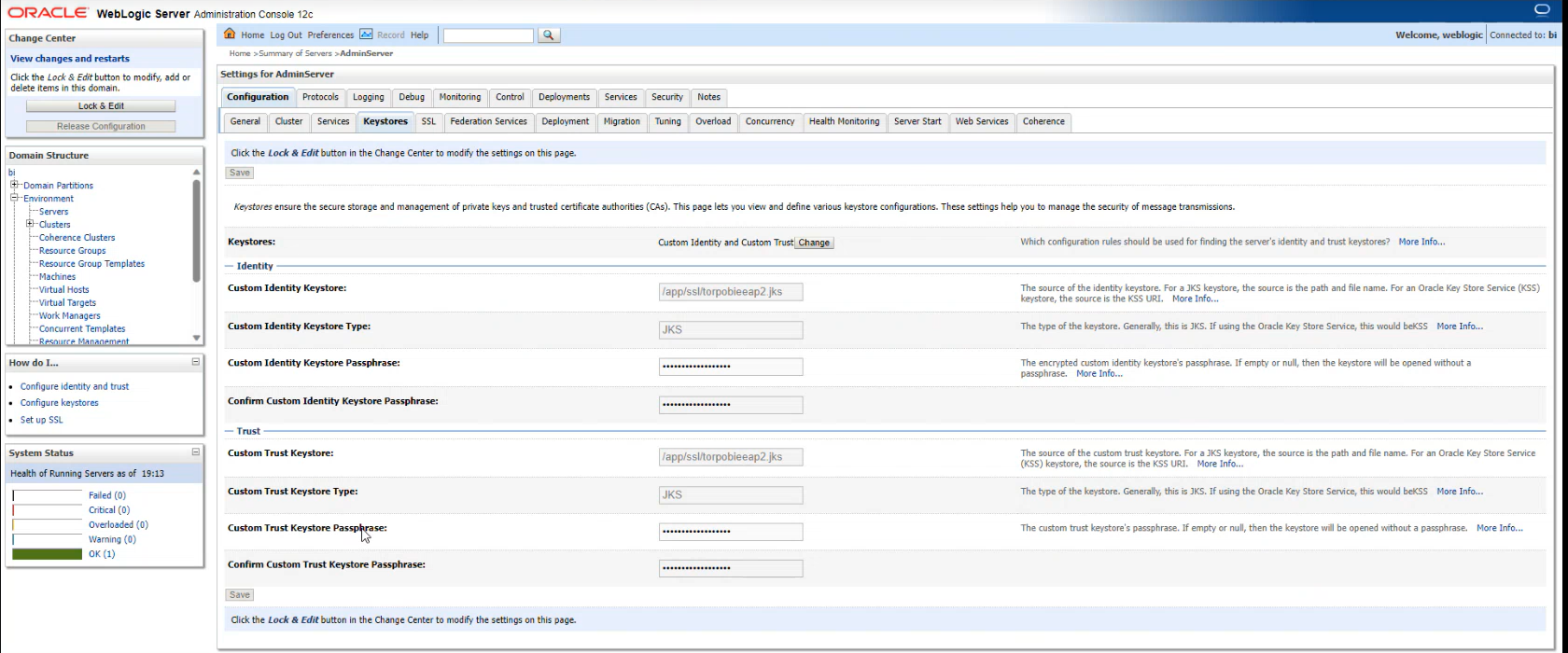
Keystore -> Custom Identity Keystore Passphrase -> Confirm the current value

-> Update Trust Keystore Passphrase -> Replace the current value -> Confirm the current value

-> Click Save
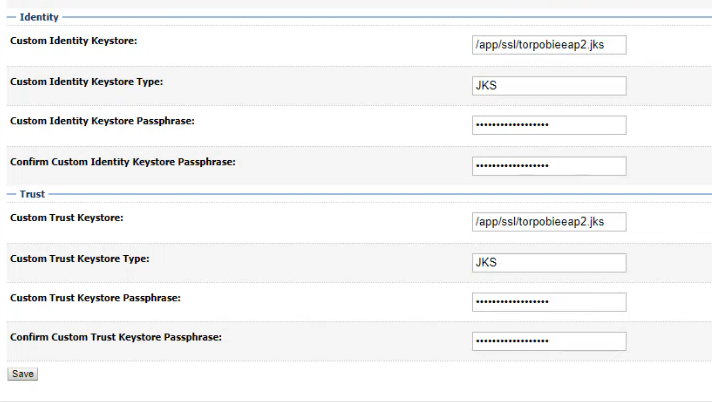

7-Upadte the Custom Identity & Trust Keystore Passphrase for Managed Server (bi_server1) :
Go to Summary Of servers :
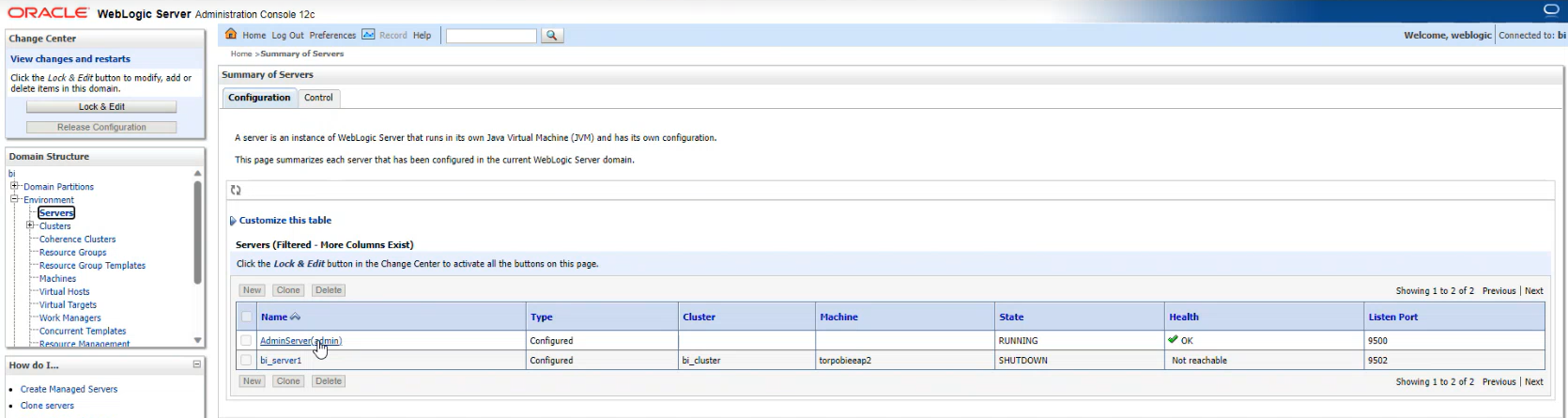
8-Environment -> Servers -> bi_server1 -> Keystores ->
Update the values for Custom Identity Keystore, Custom Trust Keystore
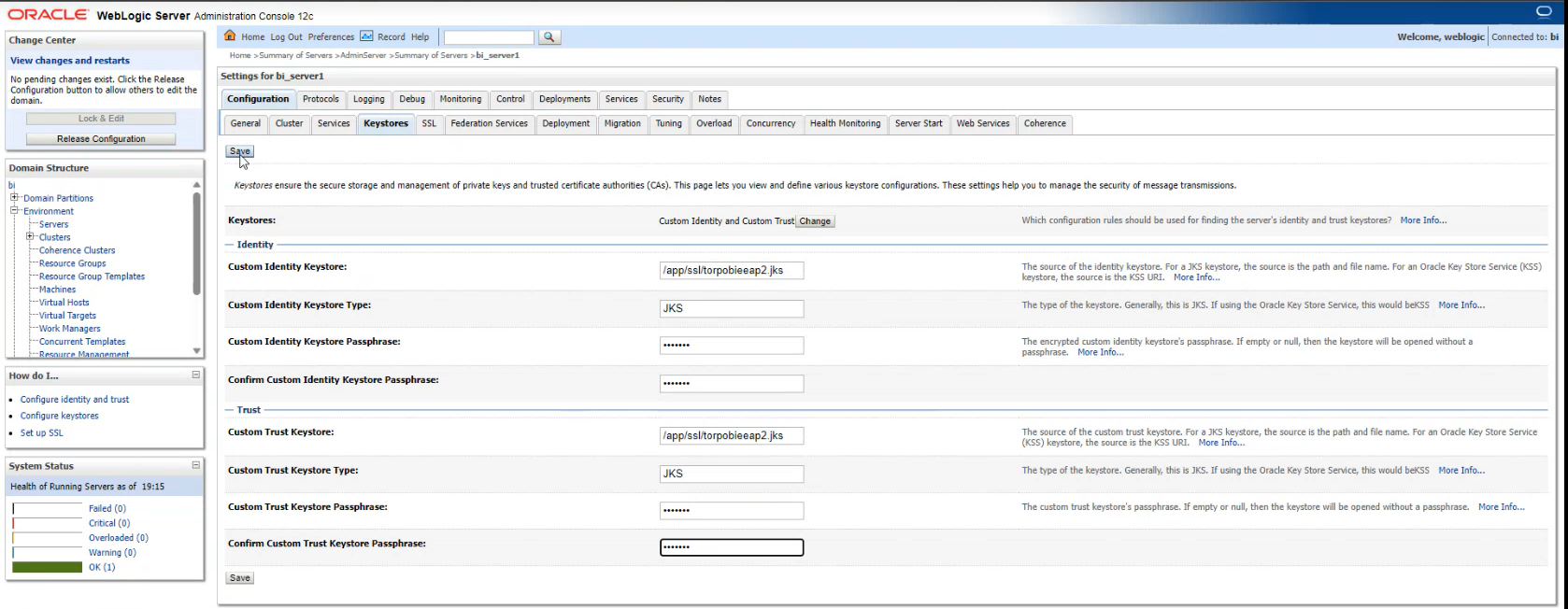
Click


9-stop weblogic admin server :
cd /app/oracle/middleware/oracle_home/user_projects/domains/bi/bin
./stopWeblogic.sh
10-make sure no oracle / or java background processes are running on Unix server by running :
ps -ef | grep oracle
ps -ef | grep java
11-Start all the middleware services :
cd /app/oracle/middleware/oracle_home/user_projects/domains/bi/bitools/bin
./start.sh
12-go to analytics login page
-Make sure you are able to login .
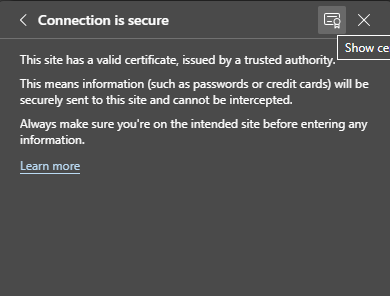
-Click on the connection security lock :
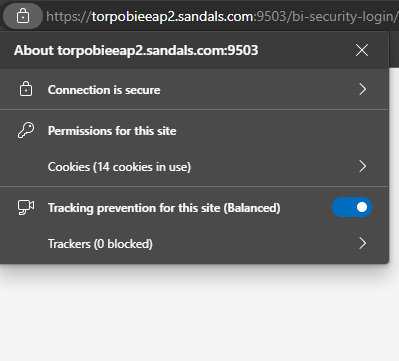
Click on ‘Connection is secure “
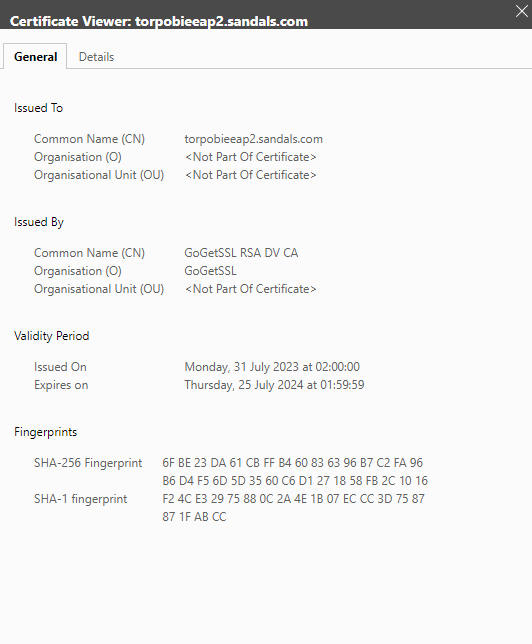
-Click on the certificate to check the validity dates :
Expanded Frequently Asked Questions (FAQ)
1. Why do I need to convert .crt files to .jks format?
Oracle WebLogic, the underlying application server for BI 12c and OAS, is built on Java. The Java Virtual Machine (JVM) uses a proprietary storage format called Java KeyStore (JKS) to manage its private keys and certificates. Standard certificates (PEM format like .crt or .pem) are not natively readable by WebLogic’s keystore manager. The conversion process usually involves a two-step bridge: first using OpenSSL to create a PKCS12 (.p12) file (which bundles the private key and public cert), and then using the Java keytool to import that bundle into a JKS file.
2. What happens if the Trust Keystore Passphrase in WebLogic is updated incorrectly?
If the passphrase entered in the WebLogic Administration Console does not exactly match the password set during the keytool generation process, the server will fail to initialize the SSL provider. This typically results in the server entering a FAILED or ADMIN state upon restart. You will likely see errors such as java.io.IOException: Keystore was tampered with, or password was incorrect in the AdminServer.log. It is vital to ensure that the “Custom Identity” and “Custom Trust” passphrases match the passwords used in your command-line execution.
3. Can I perform this certificate update without stopping the middleware services?
Technically, WebLogic allows for some dynamic changes, but for a production Oracle BI/OAS environment, a full restart is strongly recommended. This is because the SSL context—which includes the private key and the certificate chain—is loaded into the server’s memory during the boot process. To ensure that the Admin Server, Managed Servers (bi_server1), and the system components (like OBIJH or OBIPS) all acknowledge the new certificate and flush the old expired data, a clean stop and start is the only way to guarantee a consistent state.
4. How do I verify if the intermediate and root certificates are correctly installed?
Validation is key to preventing “Chain of Trust” errors. After installation, you can use the OpenSSL client command to inspect the handshake: openssl s_client -connect yourdomain.com:443 -showcerts. This command displays the entire certificate path. You are looking for a return code of 0 (ok). If the output shows “Verify return code: 21 (unable to verify the first certificate),” it means your intermediate CA file was not properly bundled into the JKS or the Java cacerts file.
5. What is the significance of the Java ‘cacerts’ file and its default password?
The cacerts file located in /usr/java8_64/jre/lib/security/ acts as the global “Truststore” for the Java environment. While your JKS file holds your server’s identity, the cacerts file tells Java which Certificate Authorities (CAs) it should trust for outbound connections. The default password is changeit. In a production environment, failing to import your new certificate into cacerts can cause internal communication failures between WebLogic components that rely on Java-based secure calls.
6. What is the difference between an Identity Keystore and a Trust Keystore?
In the WebLogic console, these serve two distinct purposes. The Identity Keystore contains your private key and the specific certificate for your server (e.g., dnlapp2.jks); it is how the server proves its identity to users. The Trust Keystore contains the certificates of the authorities (CAs) that the server trusts. In many Oracle BI configurations, we use the same JKS file for both (Custom Identity and Custom Trust), but they are functionally separate layers of the SSL handshake.
7. What should I do if I get an “Alias not found” error during the update?
This error occurs when the alias name specified in the WebLogic Console (under the Keystores tab) does not match the alias defined during the keytool -importkeystore command. In your configuration, the alias used was dnlapp2. If the console is looking for an alias like le-7823-...] or server_cert, the handshake will fail. Always use keytool -list -v -keystore yourfile.jks to verify the exact alias name before updating the WebLogic settings.
8. Why is it necessary to check for background processes (ps -ef | grep java) before restarting?
Oracle BI services sometimes hang during the shutdown phase, especially if there are active user sessions or stuck threads. If a “zombie” Java process remains active on the Unix server, it may hold a lock on the network ports (like 9500 or 9502) or the keystore files. If you attempt to start the services while these processes are running, the new SSL configuration may not load correctly, leading to port conflict errors or the server inadvertently running on the old, expired certificate cached in the hung process.
9. How can I roll back the changes if the new certificate causes issues?
Safety is paramount. Before replacing the .jks file (Step D-3), you should always create a timestamped backup of your current working environment. If the new certificate fails, you can revert by:
-
Stopping all services.
-
Restoring the
dnlapp2.jks_old_2022_23to its original name. -
Reverting the
cacertsfile in the Java directory. -
Restarting the services. This ensures that even if the new certificate files are corrupted, you can return to the previous state (even if the cert is expired) to maintain system access while troubleshooting.
10. Do I need to update the certificate on the Load Balancer (F5/Nginx) as well?
If your Oracle BI environment sits behind a Load Balancer or Reverse Proxy that performs “SSL Termination,” you must update the certificate there as well. If the Load Balancer is simply “Passing Through” the traffic, updating the WebLogic/OAS server is sufficient. However, most modern enterprise architectures use SSL at both layers (End-to-End Encryption), meaning the .crt and .key files must be uploaded to your network appliance in addition to the JKS update on the middleware server.