
Quick Summary:
To get ODI running scenarios information using SQL query commands, you must query the SNP_SESSION table located in your ODI Work Repository schema. This method allows you to monitor session names, start/end times, and execution statuses (like ‘Running’ or ‘Error’) directly from the database without needing the ODI Studio client installed.
Problem:
While running ODI scenarios in Production environment, it is not always possible to get the running scenarios names along with duration due to not having the ODI client installed on the monitoring machine.
Solution:
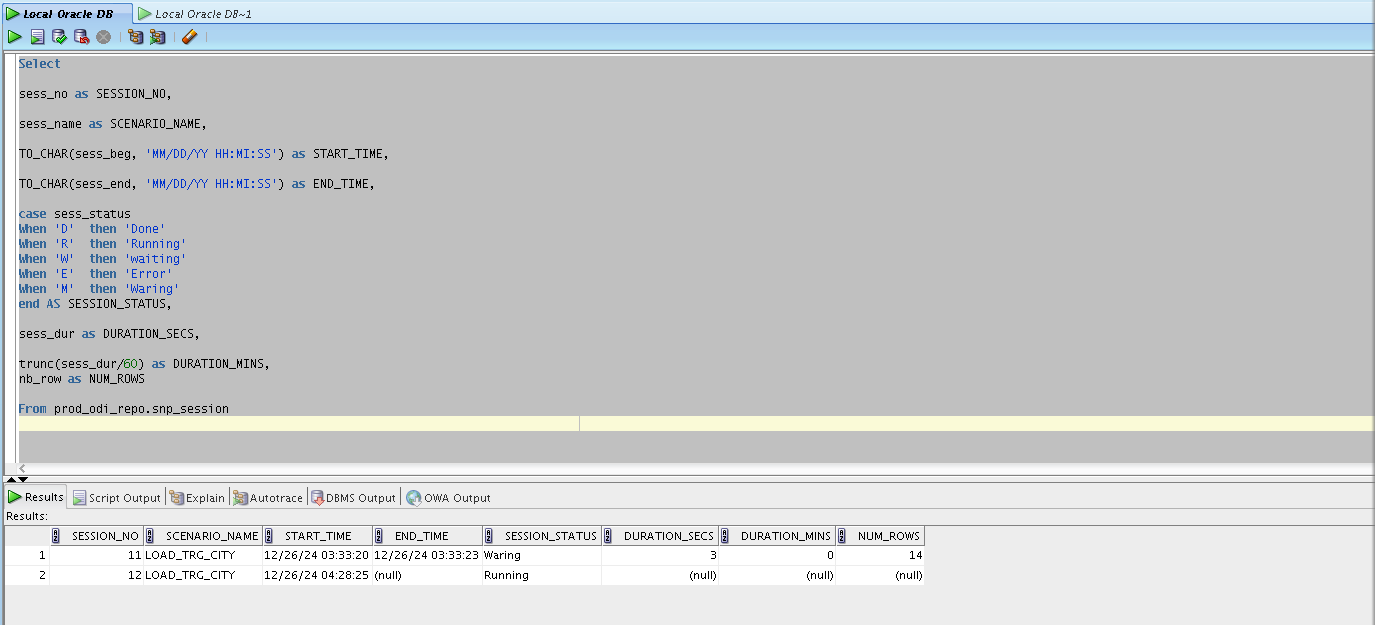
As per the below SQL query, the snp_session table, located under work repository schema, has the required information :
Select
sess_no as SESSION_NO,
sess_name as SCENARIO_NAME,
TO_CHAR(sess_beg, 'MM/DD/YY HH:MI:SS') as START_TIME,
TO_CHAR(sess_end, 'MM/DD/YY HH:MI:SS') as END_TIME,
CASE sess_status
When 'D' then 'Done'
When 'R' then 'Running'
When 'W' then 'waiting'
When 'E' then 'Error'
When 'M' then 'Waring'
END AS SESSION_STATUS,
sess_dur as DURATION_SECS,
trunc(sess_dur/60) as DURATION_MINS,
nb_row as NUM_ROWS
From prod_odi_repo.snp_session
Note :Sess_status column shows the current scenarios run status:
D –> Done
R–> Running
W–>waiting
E–> Error
M –> Waring and it will indicate that, job executed successfully with error out records (error out records will store into E$ table)
We have the same scenario run twice , fow which one of them is having a Warning stsatus ‘note that the run duration is not shown in this case:
FAQ:
1. Where is the ODI session information stored?
The data is stored in the
SNP_SESSIONtable within the ODI Work Repository schema. This table tracks every execution instance, including scenario names and timestamps.2. Why should I use SQL to monitor ODI scenarios instead of the ODI Client?
SQL queries allow for lightweight monitoring without requiring a heavy software installation on production servers. It also enables you to integrate ODI status alerts into custom dashboards or third-party monitoring tools.
3. What does the ‘M’ status represent in an ODI query?
The ‘M’ status stands for ‘Warning,’ indicating the job completed but encountered issues with specific records. These rejected records are typically stored in the associated
E$error tables for further review.4. How can I calculate the duration of an ODI scenario in minutes?
You can use the formula
TRUNC(sess_dur/60)within your SQL query to convert the raw seconds into minutes. This makes it easier to identify long-running processes at a glance.5. Which table tracks the number of rows processed in a scenario?
The
nb_rowcolumn in theSNP_SESSIONtable records the total number of rows handled during a specific session. This is vital for verifying data volume consistency in ETL jobs.6. Can I filter the query to show only currently active scenarios?
Yes, you can add a
WHERE sess_status = 'R'clause to your SQL statement. This will filter the results to display only those scenarios currently in the ‘Running’ state.7. Is it possible to see the exact start and end times for each job?
The
sess_begandsess_endcolumns provide the raw timestamps for execution. UsingTO_CHARhelps format these dates into a readableMM/DD/YY HH:MI:SSstructure.8. What happens if a scenario is in ‘Waiting’ (W) status?
A ‘Waiting’ status usually means the session is held up by a lack of available agents or a specific resource dependency. Monitoring this helps identify bottlenecks in your execution schedule.
9. Why is the duration sometimes missing for Warning statuses?
In certain ODI configurations, a ‘Warning’ status (M) might prevent the
sess_durfrom updating correctly if the process didn’t terminate normally. This is a known behavior when jobs encounter specific non-fatal exceptions.10. Do I need access to the Master Repository to run this query?
No, runtime session information is specifically stored in the Work Repository. You only need read access to the Work Repository schema (
prod_odi_repoin the example) to retrieve this data.