

Table of Contents
Short Summary:
The OBIEE Server startup Enhancement Procedure involves optimizing three critical pillars: the Admin Server, the Managed Server, and the Presentation Server. By increasing Java Heap sizes and trimming the repository (RPD) file, administrators can significantly reduce boot times and ensure a stable production environment.
Objective :
As the admin server , managed server and presentation server components are three pillars in the OBIEE system , the document shows steps that may enhance the startup performance of OBIEE server on production environment.
Note:
Please make sure to backup the whole environment (oracle home directory on OBIEE server) , prior start applying the action plan below
Action Plan :
The following steps may enhance the startup performance of the OBIEE server :
1-Increase Admin Server Java Heap :
cd /app/oracle/middleware/oracle_home/user_projects/domains/bi/bin
cp setDomainEnv.sh setDomainEnv.sh.bkup
edit setDomainEnv.sh :
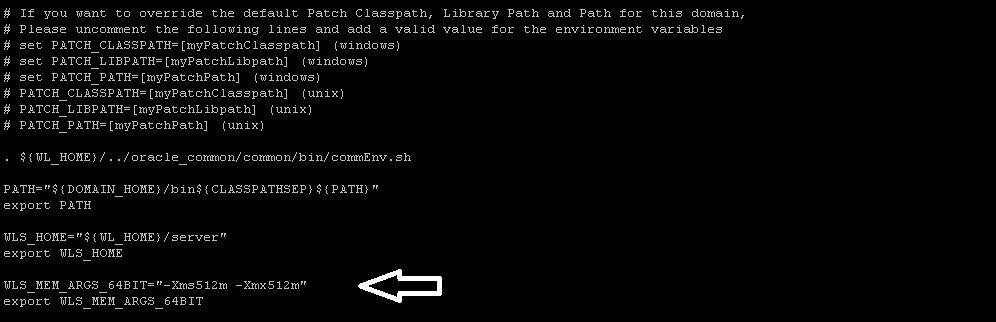
alter the following line :
set WLS_MEM_ARGS_64BIT=-Xms2048m -Xmx2048m
2-Increase the managed server java heap
In the left pane of the console, expand Environment > Servers.
In the Servers table, click the name of the server instance you want to configure.
On the Configuration tab, click Server Start. In the Arguments field,
specify the Java option to increase the heap size:
-Xms2048m -Xmx2048m
-Enter the weblogic user password twice in the bottom of the page
-Save
-Activate Changes
3-It is advisable that OBIEE prd (current repository) should be trimmed to include only the required necessary semantic objects (on 3 layers) , failing to do so will affect the server
Using prunrpd utility command to delete unwanted objects :
https://docs.oracle.com/middleware/12212/biee/BIEMG/GUID-630B6ED6-2D17-4A77-AA12-B195676B1CF7.htm#GUID-630B6ED6-2D17-4A77-AA12-B195676B1CF7
startup do to having to load all the objects and relations :
-open the obiee admin client in online mode
-save the rpd as a copy (to a safe backup place with the correct timestmap)
-remove the un-necessary repository objects
-check consistency , make sure there are no errors
-save & exit
-Restart all services using the command lines : stop.sh and start.sh:
cd /app/oracle/middleware/oracle_home/user_projects/domains/bi/bitools/bin
./start.sh
./stop.sh
FAQ
1. What is the primary goal of the OBIEE Server startup Enhancement Procedure?
The goal is to reduce the time it takes for BI services to become available by optimizing memory and metadata. It focuses on fine-tuning the Java Virtual Machine (JVM) and the repository file.
2. Which components are considered the “three pillars” of the OBIEE system?
The system relies on the Admin Server, the Managed Server, and the Presentation Server components. Each must be optimized to ensure the entire environment starts up efficiently.
3. Why should I increase the Java Heap size for the Admin Server?
Increasing the Heap size provides the JVM with more memory to manage domain configurations during startup. This prevents “Out of Memory” errors and speeds up the initialization of core services.
4. Where can I find the configuration file for Admin Server memory settings?
The settings are located in the setDomainEnv.sh file. You can find this in the /user_projects/domains/bi/bin directory of your Oracle Home.
5. How do I modify the Managed Server heap size without editing scripts?
You can modify this through the WebLogic Administration Console under the Server Start configuration tab. This allows for a more controlled, GUI-based update of the startup arguments.
6. What is the impact of a large RPD file on startup performance?
A large RPD requires the server to load every object and relationship into memory before the system becomes active. Trimming unused objects reduces this overhead, leading to a much faster boot sequence.
7. What utility is recommended for removing unwanted RPD objects?
Oracle provides the prunrpd utility for command-line repository pruning. Alternatively, the OBIEE Admin Client can be used manually to remove unnecessary semantic layers.
8. Is it necessary to check consistency after modifying the RPD?
Yes, a consistency check ensures that your deletions haven’t broken any logical joins or dependencies. This prevents the server from failing to load the RPD after a restart.
9. What is the standard command to restart OBIEE services on Linux?
The services are managed via the start.sh and stop.sh scripts located in the bitools/bin folder. These scripts ensure that all BI components are initialized in the correct order.
10. Should I keep a backup of the setDomainEnv.sh file?
Absolutely, keeping a backup allows for a quick rollback if the new memory settings cause instability. It is a best practice for any production-level configuration change.