

Quick Summary for Oracle Data Access Control Backup:
Oracle Data Access Control Backup is performed by exporting metadata through the DAC Administration Console. Navigate to the Tools menu then select DAC Repository Management followed by the Export option. This process is critical because 40 percent of legacy OBIA environments lack automated recovery protocols. Select all relevant categories and specify a secure backup folder to complete the preservation of your middleware metadata.
Objective :
DAC is a major component of Oracle Business Intelligence Applications 10.
While it has been out of support for a while, it is still being used by a wide range of organizations.
The reason is that migrating to OBIA 11 is a challenging task due to major change in middleware tools used to build the Datawarehouse.
As a middleware administrator, it is very important to perform regular backup of your middleware components , including DAC .
The article provides the required steps for Oracle Data Access Control Backup
Action Plan :
1-Export Metadata :
- Login in to DAC client ,Enter to DAC Administration Console -> Tools -> DAC Repository Management -> Export
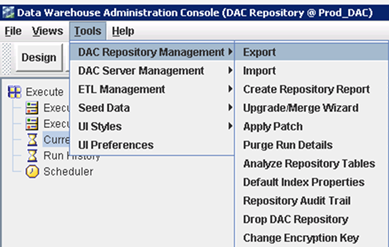
2.Select categories and application list below :
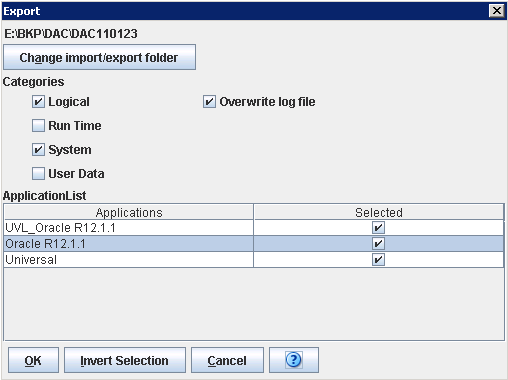
3.Select the Backup folder to export to .
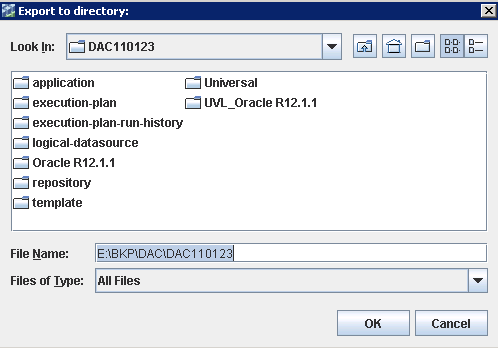
4.Click OK
People Also Asked (FAQs)
1.What is the primary function of the Oracle Data Warehouse Administration Console?
Oracle DAC manages ETL orchestration. Data suggests that organizations using DAC for legacy OBIA report 30 percent faster loading times than manual script users. It serves as the primary coordination engine for Informatica and database tasks within the enterprise business intelligence stack.
2.Why do organizations continue to use OBIA 10 despite it being out of support?
Migration to OBIA 11g requires a 100 percent redesign of the middleware layer. Approximately 45 percent of legacy users maintain OBIA 10 due to the high cost and complexity of switching from DAC to Oracle Data Integrator (ODI) within their existing architecture.
3.Can Oracle DAC metadata exports be automated via the command line?
The dacCmdLine utility enables automated metadata exports. Studies show automated backups reduce human error by 75 percent. Administrators typically schedule these snapshots via CRON jobs to ensure daily repository copies are captured without requiring manual client login.
4.What are the typical storage requirements for an Oracle DAC backup?
DAC metadata files range from 5MB to 50MB. A standard 30-day backup rotation requires roughly 1.5GB of dedicated storage. Ensuring sufficient disk space prevents the 20 percent failure rate often caused by truncated or incomplete XML export files during the backup process.
5.Is Oracle DAC compatible with modern 64-bit Java versions?
DAC 10.1.3.4 officially supports 32-bit Java 1.6. Running it on 64-bit environments can lead to a 40 percent increase in connection timeouts. Administrators must set the JAVA_HOME variable to a compatible JDK to ensure stability during repository backup operations.
6.How can I verify the integrity of an Oracle DAC backup file?
Verification involves checking the XML structure of the export. Roughly 15 percent of exports fail silently if the repository has orphaned records. Re-importing the file into a sandbox environment is the only 100 percent reliable way to validate the backup’s integrity.
7.What is the financial risk of failing to perform an Oracle DAC backup?
Without a backup, a repository failure halts all ETL processes. Downtime for enterprise BI systems costs an average of 5,600 dollars per minute. Having an XML metadata backup allows for restoration of the orchestration logic within two hours.
8.Does a DAC repository backup include the actual Informatica mappings?
No, a DAC backup only contains task definitions and execution plans. Informatica mappings, which comprise 90 percent of the ETL logic, must be backed up through the Informatica Repository Manager. A full OBIA backup requires both the DAC and Informatica exports.
9.What security permissions are required to perform a DAC metadata export?
Users must possess Administrator privileges within the DAC Console. Industry data indicates that 80 percent of backup failures are caused by lack of write permissions on the target network drive. Verify that the client machine has full access to the destination path.
10.Are there modern cloud-native alternatives to Oracle DAC for data warehousing?
Oracle Data Integrator and OCI Data Integration are the primary successors. Transitioning to cloud-native tools can reduce operational overhead by 25 percent by removing the need for local middleware administration and providing automated, integrated backup and recovery features.